Prepare monthly reports without rebuilding spreadsheets.
Record offerings and expenses once, and let the treasurer's report come from the transactions you already entered, even with one very tired treasurer.
Financial Stewardship Software for Filipino Churches
Track offerings, expenses, restricted funds, payroll, approvals and financial reports in one secure system, so your treasurer, pastor and finance committee always know where every peso went.
No installation · Unlimited staff accounts · Daily backups · Starts at ₱499/month · Demo login details ↓
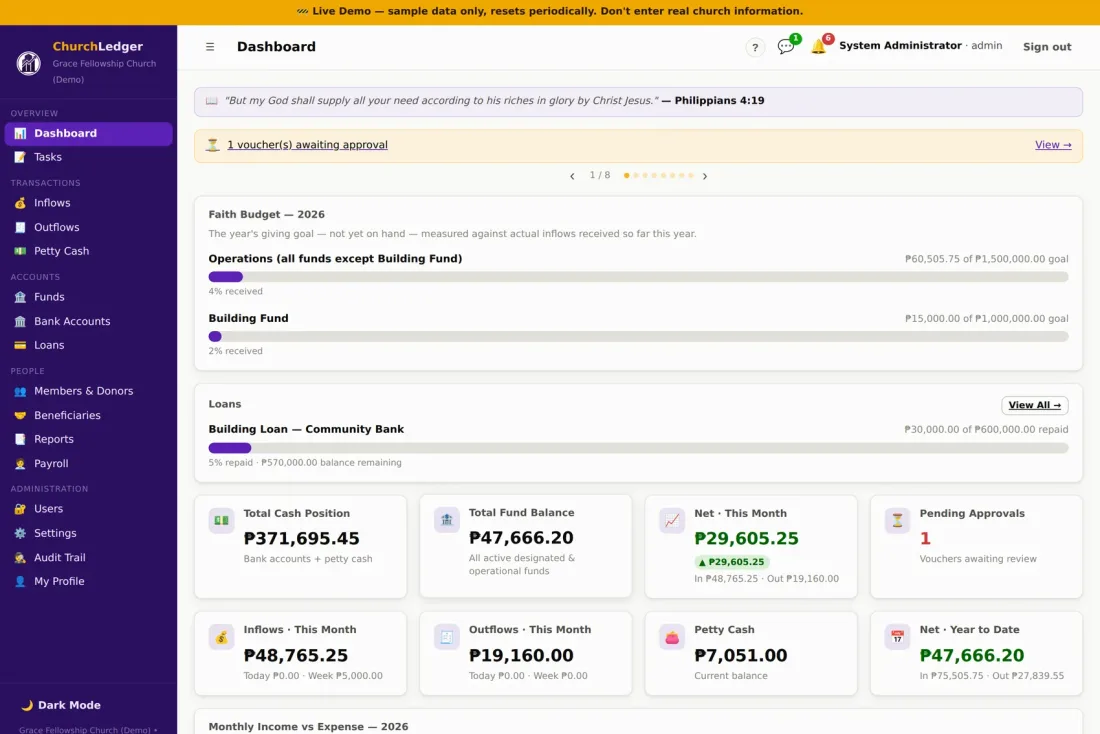
Sample figures from the live demo church.

Who it's for
Built for local churches in the Philippines that run their finances on a notebook, a spreadsheet, and one very tired treasurer.
Record offerings and expenses once, and let the treasurer's report come from the transactions you already entered, even with one very tired treasurer.
Fund balances, pending approvals, and giving against the Faith Budget, from a phone, before Sunday rather than during.
Year-end review becomes a search, not an excavation through envelopes.
Building, Mission, Youth and each congregation's own funds, reconciled in one system with one login.
Why churches switch
How it works
From the counting table to the audited report, every peso keeps its paper trail.
Sunday offerings are counted and recorded under the correct fund: General, Building, Mission, Youth or another designated ministry, with a contribution record for every gift.
Expenses go out on auto-numbered vouchers with scanned receipts attached, routed for approval by role. Petty cash reconciles against every reimbursement.
Fund balances, income versus expense, payroll and tithe withholding, and the treasurer's report are ready when the board meets, with the full trail behind every number.
See the product
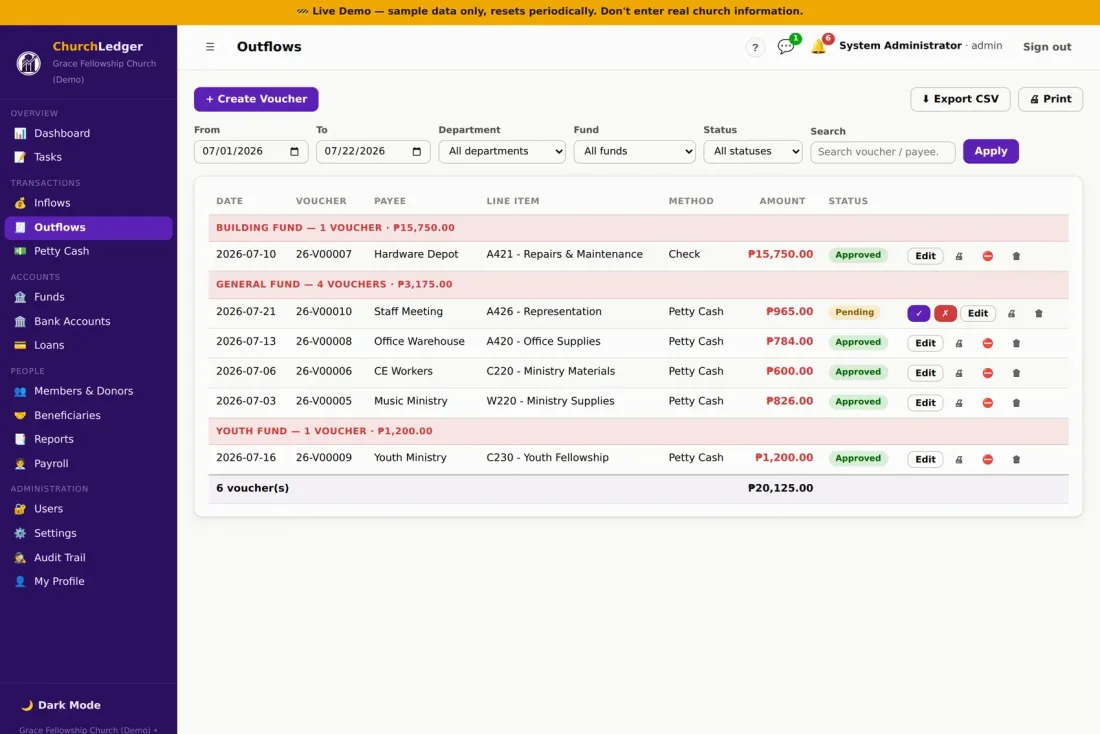
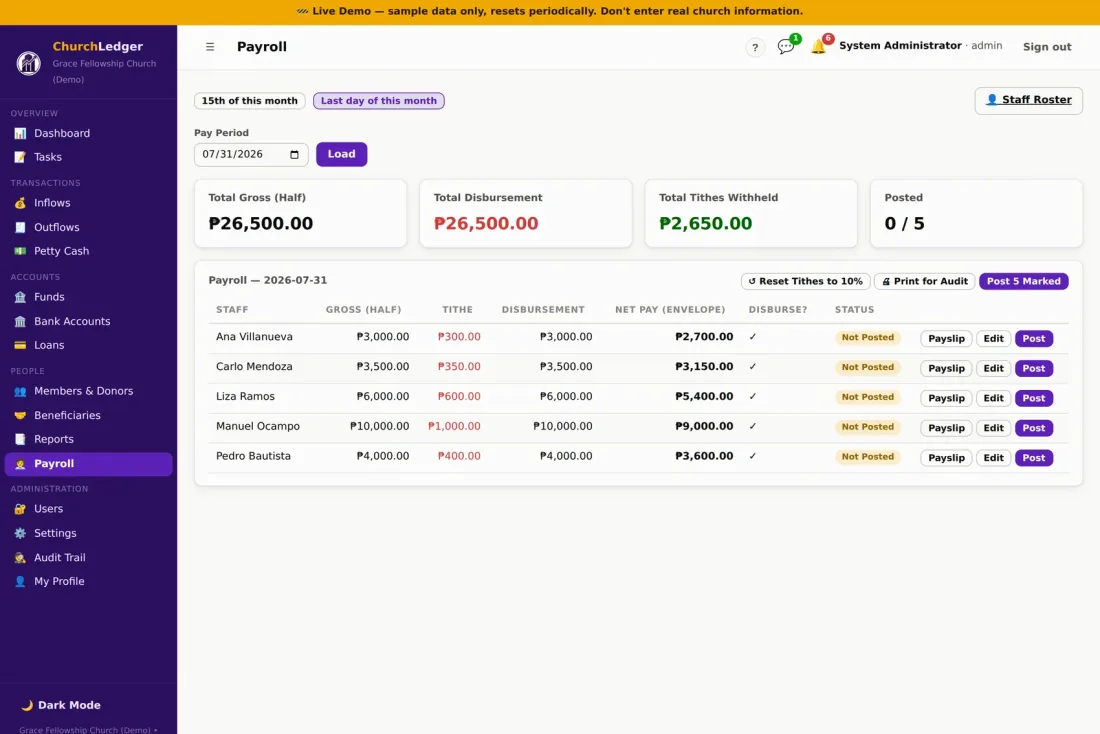
Real screens from the live demo church. Pick a screen to see what it shows.
One System, Whole Church
No more one spreadsheet for tithes, another for payroll, a third for the building fund. ChurchLedger is the single ledger of record, for every department, every fund, every peso.
Building, Mission, Youth. Each fund keeps its own balance and can never quietly borrow from another.
Half-month pay periods, automatic tithe withholding, and printable payslips for every staff member.
Track the physical cash box down to the peso, reconciled against every reimbursement voucher.
Track the year's giving goal against what's actually been received, for operations and building funds alike.
Building loans, equipment financing, repayment schedules that reconcile straight into your funds.
Keep the finance conversation and the follow-up items attached to the numbers, not lost in group chats.
From the offering box to the ledger
Record every contribution, attach supporting documents to every voucher, and keep a searchable financial trail with an approval history no one can quietly edit.
Reports
Data entry is the means. These are the outputs a treasurer, a finance committee and an auditor get from ChurchLedger, generated from the transactions already recorded, not rebuilt by hand each month.
Every list exports to CSV for Excel or Google Sheets, and report and payroll views are print-ready.
Security & data
ChurchLedger is hosted and maintained by JedRey IT Solutions. These are the safeguards in place today, stated plainly.
Every session runs over HTTPS, on a phone, tablet or laptop.
The database is backed up automatically every day, with recovery handled by our team.
Staff, admin and treasurer roles control who can enter, approve and view.
Every voucher records who created, edited and approved it, with attachments kept alongside.
Staff can correct entries for 30 days; after that only an admin can unlock them.
Scanned receipts and supporting papers are attached to the voucher they belong to, not filed in an envelope.
Your admin adds and removes users. When a treasurer changes, access changes with them.
Transaction lists export to CSV at any time. The records belong to your church, not to us.
Your church can export its records before cancellation, and your data remains your church's property. There is no lock-in and no exit fee. Full details are in our privacy policy.
Pricing
Simple monthly hosting and support.
Every feature is included in every plan. You only pay for secure hosting, daily backups and a person who answers when your treasurer calls.

Questions
No. There is no license fee and no feature locked behind a paywall. Every module, including payroll, loans and Faith Budget, is included in both plans. The monthly fee pays for secure hosting, daily backups, and support.
Essential (₱499 per month) is hosted and self-serve with a guided setup wizard and email support. Full Service (₱999 per month) adds migration of your existing records, a live onboarding session, priority direct support, help creating new funds and departments, and onboarding for new treasurers or staff as your team changes.
Yes. On the Full Service plan we migrate your existing records and chart of accounts for you. On Essential, the guided setup wizard walks you through entering opening balances yourself.
Your church can export its records before cancellation, and your data remains your church's property. You can cancel any time.
Yes. Both plans include unlimited staff and admin accounts. Access is role-based, so staff, admin, and treasurer roles each see and do only what they should.
Yes. Roles control who can enter transactions, who can approve vouchers, and who can view fund balances and reports.
Yes. Bank accounts are tracked separately, and restricted or designated funds such as Building, Mission, and Youth each keep their own balance.
Yes. Transaction lists export to CSV, which opens in Excel or Google Sheets, and reports, payslips, and audit views are print-ready.
No. ChurchLedger runs in a web browser on a phone, tablet, or laptop. There is nothing to install and nothing to update.
Essential includes a guided, self-paced setup wizard and email support. Full Service includes a live onboarding session with your finance team and onboarding for new treasurers or staff later on.
Yes. ChurchLedger is built and supported by JedRey IT Solutions in Sariaya, Quezon, so custom funds, departments, and workflows are set up by the people who wrote the software.
ChurchLedger maintains your church's internal financial records, receipts and acknowledgments, and supporting documents. Churches should continue using any BIR-required or organization-approved forms that apply to them.
Get started
See how ChurchLedger handles your church's offerings, funds, expenses and reports. Open the demo church, click around, then book a walkthrough and we will show you how your own funds and departments would be set up.
No software license fee · Plans from ₱499/month · Cancel anytime
Book a free walkthrough
Three fields are enough. We reply within one business day to set up a 30-minute walkthrough of the demo with your finance team, and follow with a plan recommendation. No obligation.
Your request is in. We reply within one business day, usually sooner.